.png)
The Definitive Patient Engagement Software Buyer's Guide
Patient engagement is about much more than bedside manner and on-time appointments. Your digital presence is key to getting patients through the door and enticing them to stay; in fact, recent studies show that 80% of patients now prefer digital communication channels for their medical care, and 72% actively use online reviews to choose their healthcare providers.
If that isn’t enough of a reason to prioritize tech, consider your internal operations. Repetitive administrative tasks, such as manual data entry, constant phone tags, and administrative bottlenecks, threaten to drain clinical efficiency and frustrate patients.
The root cause of this friction is not a lack of technology, but a reliance on fragmented point solutions. Managing separate, independent tools for patient intake, insurance eligibility checks, and appointment scheduling creates operational silos and headaches for patients.
True practice optimization requires shifting away from standalone point solutions. In this guide, we’ll explore how optimizing your digital front door helps healthcare organizations safeguard their bottom line, combat staff burnout, and deliver the modern, seamless care experience that today’s patients expect.
- Top features to look for in a patient engagement platform
- How to choose the best patient engagement platform
- The top patient engagement software solution: Promptly
- Patient engagement software FAQs

Top features to look for in a patient engagement platform
High-performance systems go beyond basic patient portals by combining separate features into a single system. Key features to look for include:
- A central, portal-free system architecture: Look for a portal-free experience that utilizes secure, login-free smart links sent directly via text or email, allowing patients to seamlessly interact with the practice on their own devices. Sending a secure text link triggers a sharp increase in pre-visit registration compliance.
- Automated Real-Time Eligibility (RTE) and Patient Cost Estimates (PCE): RTE for insurance during scheduling reduces manual desk queues and stops pre-visit collection errors. Automated systems run these checks automatically prior to the visit and use payer contract data to generate accurate PCE. That way, staff can reliably predict their revenue and patients aren’t caught off guard by their balance due.
- Specialty workflow customization: Different specialties (such as ophthalmology, dermatology, orthopedics, and ENT) require unique intake forms, so your system should enable you to customize its forms. Within your practice, your system should offer segmented forms based on the patient’s history and appointment type (e.g., a first-time patient coming in for a routine checkup should receive different forms than a returning patient coming in for a specific procedure).
- Scheduling tools: Intelligent scheduling tools should do more than let patients schedule. The top platforms actively optimize your practice calendar by automatically alerting waitlisted patients to fill open slots, reducing no-shows.
- Referral management: Referrals are a massive source of revenue for your practice. The best software automates the full referral lifecycle—from communicating with referring physicians to digitizing handwritten notes and blurry faxes—to automatically populate patient profiles.
- Digital payment collections: To modernize billing and eliminate the costs of paper statements, your patient engagement software should include built-in payment processing. Features include login-free Text-to-Pay, online portals that support virtual wallets like Apple Pay and Google Pay, and direct integrations with patient financing options such as CareCredit.
- Communication management: Ensuring your patients have the information they need to manage their appointments and make informed decisions about their healthcare journey is essential for securing their loyalty. Patient engagement software should empower practices to automatically send appointment reminders, segment messages, and support two-way communication.
- HIPAA and PCI compliance: As previously mentioned, practices have a greater responsibility to protect patient information than other types of organizations. Your software must be able to fully comply with HIPAA, PCI, and other data and privacy standards.
- Automated reputation management: Built-in reputation management modules use sentiment funneling to text patients a brief satisfaction survey, routing happy patients to leave 5-star public reviews on sites like Google. Constructive feedback stays private, giving practice managers a direct opportunity to address patient concerns internally.
- Fax and referral management: When your practice is buried in faxes and referrals, it’s harder to fill your schedules efficiently and secure revenue. With solutions like Promptly’s AI Fax, practices can sort and prioritize messages, seeing patients faster with less effort.
Prioritizing a comprehensive, automated feature suite completely insulates your medical group from the operational friction of vendor fatigue.
How to choose the best patient engagement platform
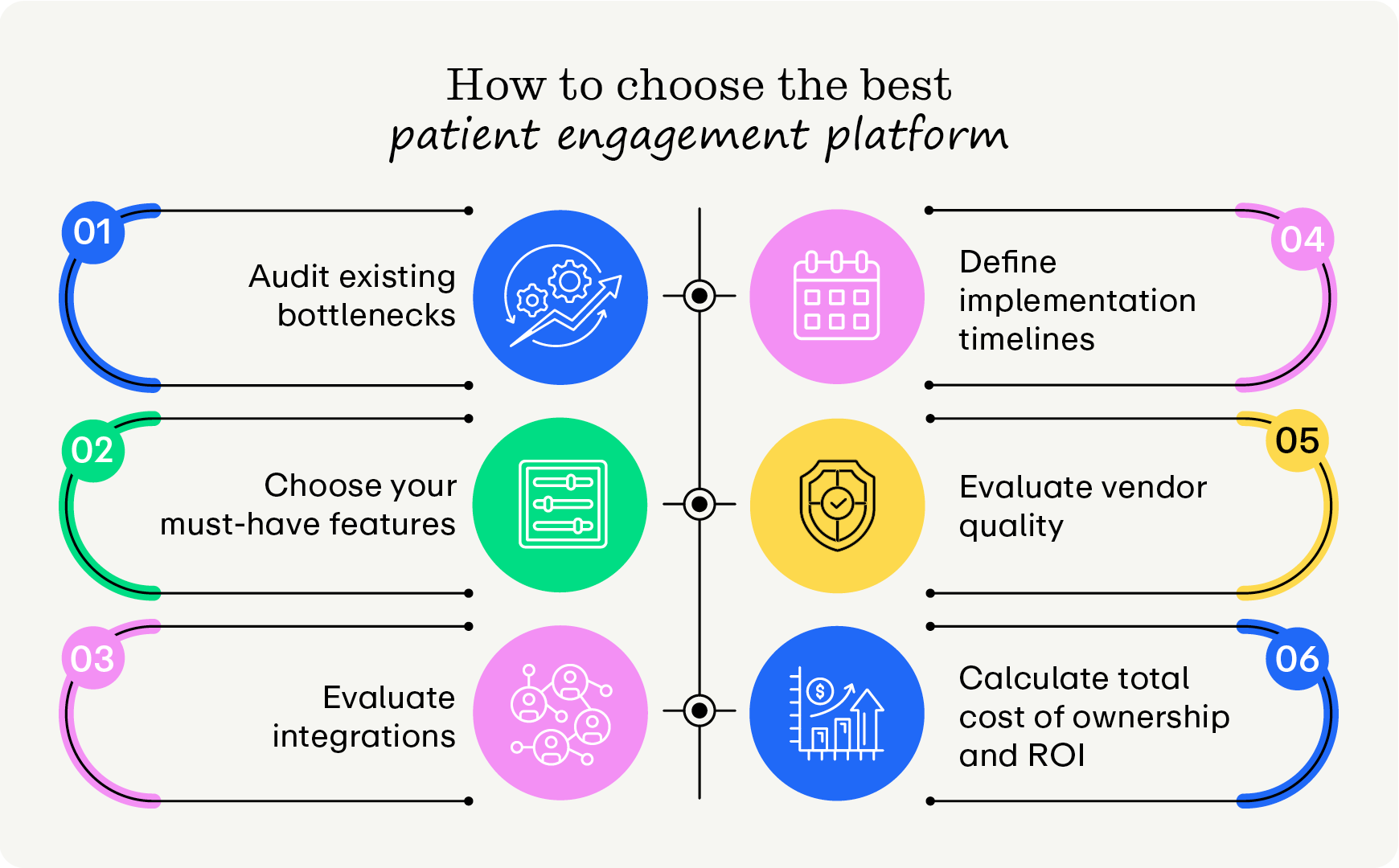
1. Audit existing front-office operational bottlenecks
Evaluating your current administrative workflows reveals exactly where gaps and bottlenecks lie. Audit your current state by:
- Going through the patient journey yourself: Go through the steps of finding your practice online, scheduling an appointment, paying your balance, and leaving feedback. Note any points where the process becomes confusing, inefficient, or inconvenient.
- Identifying point-solution gaps: Practices with many disconnected point solutions are more likely to have redundant features and waste time working across disparate systems. Audit your current tech stack to reveal overlapping features and the time it takes to manually reconcile information between systems.
- Tracking staff time: Document the time spent on manual tasks, such as checking insurance eligibility or calling patients to obtain missing details. Once you have that time, you can convert it to a monetary value by multiplying the hours lost by the staff's average hourly wage.
Uncovering these specific performance gaps establishes a clear baseline for measuring future software return on investment (ROI).
2. Choose your must-have features
Once you understand where the bottlenecks are, work with your team to determine the features that best bridge those gaps. Answer these questions to get on the right track:
- What are the most common complaints we receive from patients regarding our booking, check-in, or payment processes?
- Which daily administrative tasks consume the highest percentage of our front-desk staff's time?
- Where do data silos or manual entry errors most frequently occur within our current technology stack?
- What specific features do our staff feel are missing from our existing tools to make their workflows more efficient?
- Are we experiencing a high volume of missed appointments, unverified insurance claims, or delayed patient collections?
3. Evaluate integration depth
A software solution is only as valuable as its ability to communicate with your current infrastructure. To verify compatibility, examine how information flows between separate software modules. Some key areas to look for when evaluating tech integratability include:
- A unified solution set: Look for a comprehensive, all-in-one platform rather than a patchwork of add-on modules that require custom development. A centralized system ensures stability and prevents functionality from breaking during software updates.
- Automated scheduling and intake sync: Patient data should be synced to your intake software instantly when an appointment is booked. Look for systems that automatically generate digital intake links, eliminating manual staff intervention.
- Secure, direct data flow: Verify that all collected clinical and demographic details flow cleanly into your primary patient data management system. This automation guarantees patient charts remain accurate and up to date in real time.
Ideally, practices would use a system that manages as many tasks as possible. However, if you have tech that you want to keep, find systems that integrate seamlessly with it. That way, you won’t have to waste time (and risk incorrect information transfer) by manually transferring information.
4. Define implementation timelines and staff onboarding support
Even the best-fit platform on paper won’t actually create results if it takes too long or is too complicated to implement. Prioritize platforms that offer the following capabilities:
- A structured onboarding timeline: Look for vendors that provide a clear, realistic implementation timeline that aligns with your schedule.
- Dedicated account management: Ensure you receive a specific implementation specialist rather than a generic support inbox. Having a single point of contact speeds up troubleshooting during data migration.
- Comprehensive staff training: Look for platforms that offer role-specific training modules (e.g., customized training for front-desk receptionists versus billing administrators) to accelerate team adoption and minimize operational friction.
Not all training offerings are the same, so tailor your training to suit your staff. For instance, if your staff is just starting out with patient engagement software, they will need more hands-on training than a more tech-savvy staff.
5. Evaluate vendor customer support and service level agreements
Your practice relies heavily on its software to check in patients and collect payments. Technical glitches or downtime can significantly disrupt your front office, making ongoing vendor support critical.
Prioritize platforms that offer the following support standards:
- Guaranteed response times: Review the vendor’s Service Level Agreement (SLA) to ensure they guarantee rapid response times—ideally under an hour for critical, workflow-stopping issues.
- Omnichannel support access: Verify that your staff can reach support through multiple channels, including live chat within the software, phone support, and an accessible knowledge base for quick self-service.
- Proactive system monitoring: Choose a partner that actively monitors system performance and communicates scheduled maintenance windows well in advance, ensuring updates occur outside of your peak clinical hours.
Keep in mind that there are different types of support—live and asynchronous (e.g., cheat sheets, training videos, and downloadable guides). Your vendor should offer both types of support to cover an array of situations.
6. Calculate the total cost of ownership and ROI
Your practice has to research the additional costs of the software besides the sticker price. To protect your practice's bottom line, you need to look past the base monthly subscription price and calculate the true, long-term financial impact. Prioritize platforms that offer:
- Transparent pricing models: Request a clear breakdown of all upfront and recurring costs. Beware of hidden fees for implementation, data migration, custom API integrations, or per-user seat licenses that scale up your costs.
- Predictable payment processing fees: If the platform handles patient payments, evaluate their merchant processing rates. Look for transparent, flat-rate pricing structures rather than complex tiered models that eat into your revenue.
- An ROI timeline: Use the baseline metrics from your initial operational audit to calculate how quickly the software will pay for itself through reclaimed staff hours, reduced no-shows, and faster billing cycles.
Note that while you can always estimate costs, you should be prepared for unexpected costs. Build a contingency cushion into your budget to handle any additional costs.
The top patient engagement software solution: Promptly
Specialized clinics cannot rely on software built for general practitioners. Promptly addresses unique operational needs with advanced automation tools that streamline workflows, maximize performance, and (most importantly) improve patient care.
Promptly’s top features include:
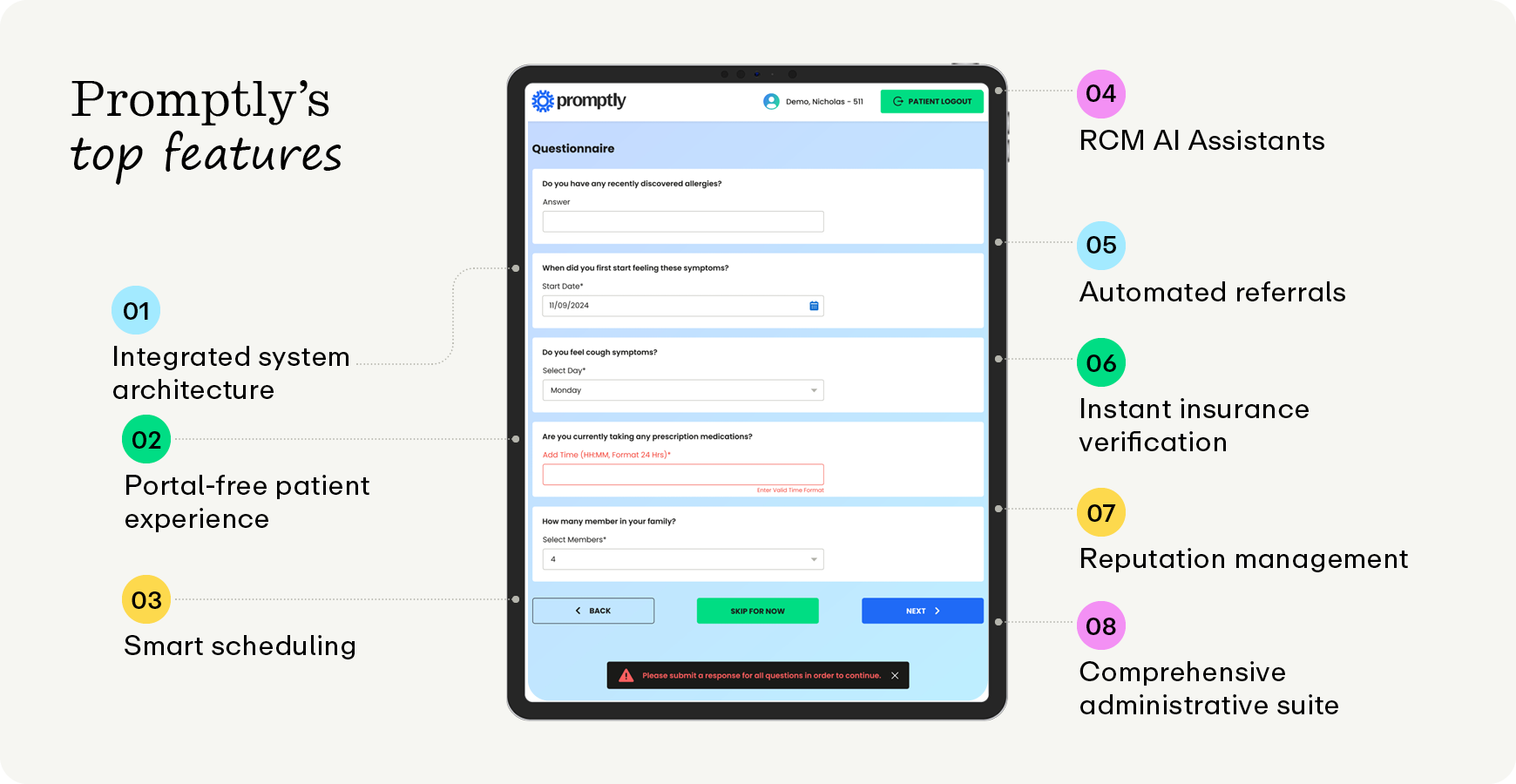
- Integrated system architecture: While other solutions rely on disparate point solutions that create data silos and vendor fatigue, Promptly delivers an all-in-one platform built for practice automation. Consolidating four or more fragmented software services into a single suite annually saves the average Promptly user $88,000 and recovers 1,728 staff hours.
- Portal-free patient experience: Instead of relying on traditional patient portals that force patients to remember passwords, download apps, or navigate clunky interfaces, Promptly utilizes secure, login-free smart links. Delivered directly via text or email, these links empower patients to schedule, check in, and pay bills in seconds on their own mobile devices.
- Smart scheduling and active revenue generation: Promptly goes beyond basic calendar management by using logic-based scheduling, automated waitlists, and targeted recall and reactivation campaigns. This proactive workflow drives an average of $1,170,000 in new revenue annually for practices and reduces no-show rates by up to 90%.
- End-to-end RCM AI Assistants: Promptly’s RCM is powered by specialized AI agents like the Prior Authorization Specialist to block front-end denials 24/7. Additionally, the EOB & ERA Payment Posting Assistant instantly digitizes paper claims.
- Automated referral processing: Promptly eliminates manual documentation backlogs using a dedicated referral portal with built-in AI Fax integration. It automatically reads messy, handwritten, or multi-page faxes, extracting patient data and cutting manual fax processing time.
- Instant insurance verification: Promptly checks coverage in real time, starting up to 10 days prior to the patient's appointment. This proactive check prevents unexpected pre-visit claim denials and reduces staff verification time by 60%.
- Reputation management tools: The platform builds community reputation using automated sentiment funneling to text patients a standardized 3-question survey following their visit. This process achieves an 18-20% response rate compared to the 5-10% industry average.
- Comprehensive administrative suite: Promptly seamlessly coordinates patient communication, payment, and proactive relationship management. Using Promptly Payments' text-to-pay alerts, practices can collect an average of $6.84 per outstanding balance notification.
Our results speak for themselves: practices switching from Clearwave to Promptly report a 155% increase in pre-visit form completion and resolve a 48% gap in verified patient insurance prior to appointments. Similarly, practices switching from Phreesia achieve a 48.3% increase in pre-registration.
Patient engagement software FAQs
Why is patient engagement important?
Patient optimization directly impacts clinical care quality and financial performance. Not only are modernized engagement strategies required to remain competitive, but implementing automated infrastructure helps groups secure long-term operational consistency across all departments. Some other key benefits are:
- Better health outcomes: Patients who understand their treatment plans are significantly more likely to adhere to them and avoid preventable complications.
- Enhanced patient satisfaction: When people feel heard, respected, and informed by their providers, trust increases, leading to a much stronger patient-doctor partnership.
- Improved clinical efficiency: Clear, two-way communication reduces administrative bottlenecks and ensures medical staff can deliver targeted, personalized care without wasting time solving avoidable misunderstandings.
- Competitive market relevance: Modernized communication strategies are now required to remain competitive, as patients increasingly prefer digital channels and rely on online reviews to choose their providers.
- Long-term operational consistency: Implementing automated infrastructure helps groups secure consistency across all departments, preventing the friction caused by fragmented point solutions.
- Resilience against market shifts: Cultivating active patient participation acts as a strategic buffer, protecting a clinic from sudden or unexpected changes in the healthcare market.
Ultimately, an engaged, empowered patient community is more likely to take an active role in their own well-being, helping your practice continue providing high-quality healthcare with minimal administrative strain on your team.
What is patient engagement software?
Patient engagement software is the core digital infrastructure that automates interactions between healthcare providers and patients. Modern patient engagement platforms integrate scheduling, communication, intake, insurance eligibility verification, and revenue cycle management (RCM) into a single system. Using these tools drastically improves patient experience, staff satisfaction, and practice results.
Some other advantages of using patient engagement software include:
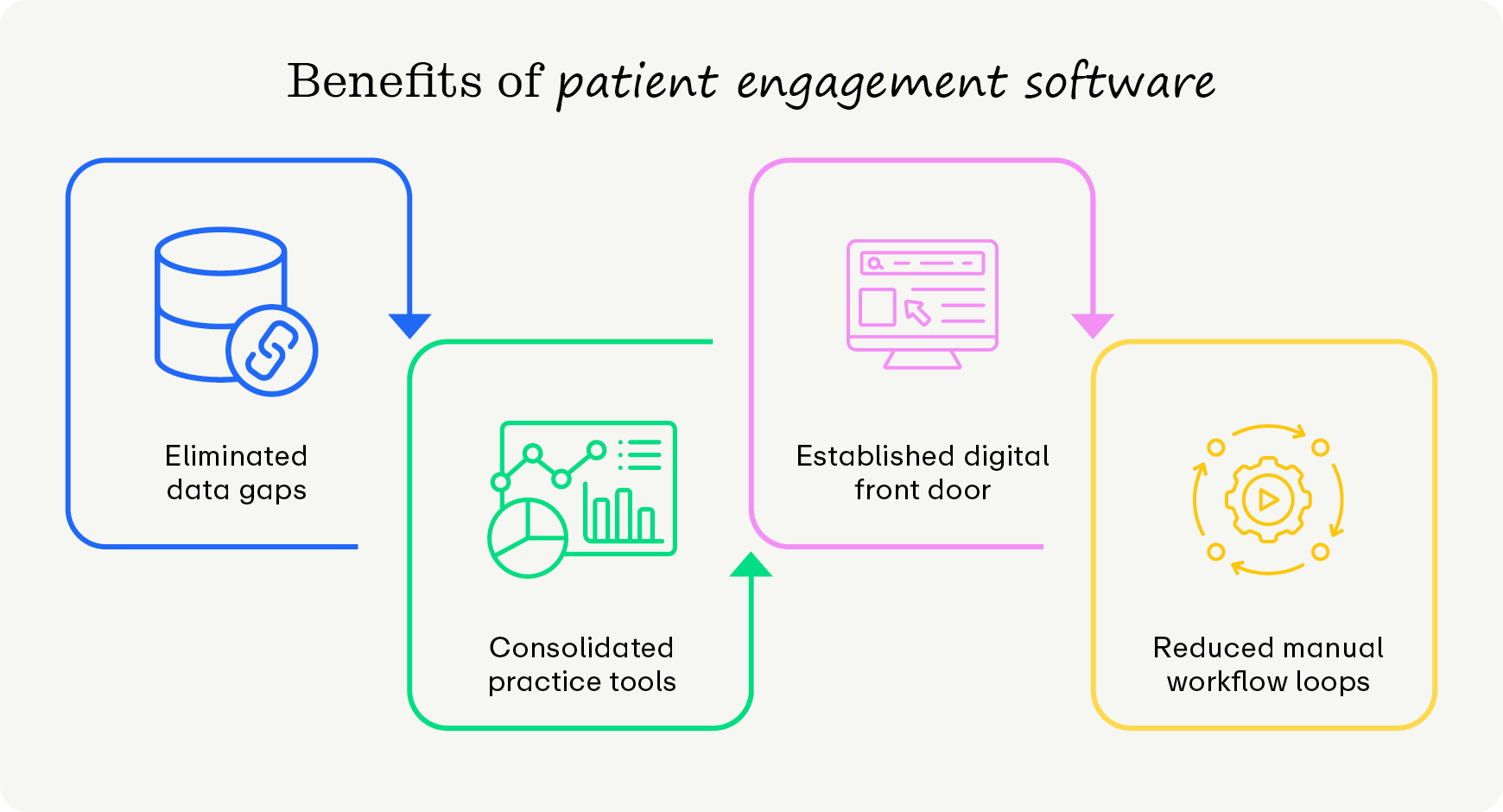
- Eliminating data gaps: Staff use the central framework to connect clinical intake workflows directly with practice billing systems. Linking patient data directly to your billing engine helps prevent front-end denials caused by outdated or incorrect insurance data.
- Consolidating practice tools: Modern, automated patient engagement platforms combine features like scheduling, registration, and communication into one system. Medical practices can phase out disconnected single-use messaging services that fail to share data.
- Building a digital front door: A unified system doesn’t just affect internal users. The software establishes a single entry point for patients to manage their care journey from intake to payment. Eliminating fragmented web logins allows patients to seamlessly schedule appointments and settle balances without frustration.
- Reducing manual workflow loops: Medical practices deploy these systems to prevent transcription errors and save staff time. In other words, entering information once into a secure digital environment ensures data remains reliable throughout subsequent care episodes.
However, not every patient engagement tool is created equal. We’ll review how to choose the best tool for you later.
What is the difference between a patient engagement platform and point solutions?
While both options deploy technology to interact with patients, they impact a practice’s internal operations in completely opposite ways. Understanding this distinction prevents medical groups from accidentally investing in software that creates more work for their staff.
The operational differences break down into two distinct categories:
Point solutions
A point solution is a single-use software application designed to solve one specific problem—such as a standalone text reminder tool, a separate digital clipboard app, or an independent payment portal. Because these tools are built for specific tasks, they can create severe data silos, force staff to constantly switch between multiple open tabs, and require manual data reconciliation at the end of every day.
Patient engagement software
A comprehensive patient engagement platform combines multiple point solutions into a single system. Instead of juggling four or more separate logins, front-office teams manage scheduling, intake, real-time insurance verification, and billing from one central dashboard. Information flows instantly across modules, meaning a change made during digital intake automatically updates the billing engine and the patient's chart without human intervention.
Relying on point solutions results in inefficient workflows and high subscription costs for overlapping features. Transitioning to a single platform eliminates these manual workflow loops, protecting your practice from administrative bottlenecks while providing a seamless experience for your patients.
What are the challenges of choosing patient engagement tools?
Selecting an enterprise software solution requires navigating specific technical obstacles. Many medical groups mistakenly purchase superficial point solutions that fail to address deep-seated operational inefficiencies. For instance, you might come across these pitfalls during the buying process:
- Integration complexity: The system struggles to sync new software with legacy practice management systems and existing electronic health records (EHR). Failing to synchronize records traps healthcare data in separate, rigid software applications, which only adds work and complexity.
- Staff adoption resistance: Navigating change management challenges when transitioning from manual, paper-based workflows to automated digital platforms is challenging. Administrative employees accustomed to physical paper clipboards often push back against digital systems during deployment if they are not properly supported.
- Security and compliance concerns: High data security standards are essential for complying with HIPAA and other laws governing sensitive health and payment information.
- Feature limitations: Single-purpose software applications force front-office teams to juggle multiple conflicting platforms to complete simple administrative tasks.
Being aware of these pitfalls can help your team intelligently strategize and prevent jeopardizing your investments.
Wrapping Up
Ultimately, by replacing the friction of manual data entry, missing insurance verification, and clunky patient portals with an automated, single-system workflow, you effectively buy back your staff's time and secure more revenue.
The choice comes down to whether your practice will continue to absorb the hidden costs of fragmented software or deploy a unified engine like Promptly to run a highly efficient, self-sustaining front office.
Learn more about patient engagement software with these free guides:
- 15 Digital Patient Engagement Tools to Enhance Your Tech. Healthcare practice managers need to use cutting-edge digital patient engagement tools to secure loyal patients. Learn more in this healthcare tech guide.
- Patient Satisfaction Surveys: Tips and 40+ Questions to Ask. Patient satisfaction surveys are essential for aligning your practice with patient expectations. Discover how to optimize your patient surveys in this guide.
- An Essential Guide to AI Healthcare Technology for Practices. Using AI healthcare technology can supercharge your practice's operations. Learn everything you need to know in this guide for healthcare professionals.
Ready to future-proof your practice?
Lock down time and revenue for your practice with Promptly’s comprehensive patient engagement suite.
Related Posts
About the author
Greg Grasso has been in the healthcare industry for over a decade, helping practices of all subspecialties exceed their business goals while improving their patient experience by utilizing innovative technologies and automation systems. Greg previously worked as the director of enterprise solutions within one of the largest ophthalmology-specific software companies in the country.

Share this article:

We automate the tedious stuff so people can do the people stuff