
HIPAA-Compliant CRMs: A Guide for Medical Practices
Many specialty practices assume privacy rules only kick in after someone walks through the clinic doors for an appointment. In reality, when a prospective patient provides any health information in their initial contact form, that message is generally treated as protected health information. This misconception leads many teams to handle website inquiries with regular email or everyday business software.
Standard business tools aren’t designed to protect private medical information, which can create compliance gaps before patient care even begins. At the same time, patients expect digital conveniences like online self-scheduling and quick text messages from their providers, so going back to phone calls and paper forms isn’t a realistic fix either.
A HIPAA-compliant customer relationship management (CRM) platform closes this gap by protecting patient details in every message while reducing manual front-desk work. This guide explains how healthcare-specific platforms work, the security safeguards HIPAA requires, and how to choose the right system for your practice. We’ll cover:
- HIPAA-compliant CRM FAQs
- Core features of a HIPAA-compliant healthcare CRM
- How to choose the right HIPAA-compliant CRM for your specialty practice
- Promptly: A unified patient experience platform for specialty practices
HIPAA-compliant CRM FAQs
What is a HIPAA-compliant CRM?
A HIPAA-compliant CRM is specialized customer relationship management software designed for healthcare organizations to manage patient acquisition, communication, and scheduling while complying with federal privacy and security rules.
Healthcare CRM systems treat every inquiry as protected medical data. They use HIPAA-compliant forms and secure communication protocols to allow clinics to follow up with prospective patients quickly without risking federal privacy violations.
Why are HIPAA-compliant CRMs important?
Under HIPAA, your practice is responsible for every digital tool that handles patient information, and recent data shows why that matters:
- Financial impact of breaches: The healthcare sector incurred average data breach costs of over $6.64 million in 2026, maintaining the highest breach costs of any industry. Recovering from an incident involves forensic investigations, notifying affected patients, working with outside consultants, and regulatory fines. For small to mid-sized practices, software with built-in safeguards is one of the most practical ways to reduce that exposure.
- Enforcement focus on risk management: In addition to healthcare-specific compliance, your system must also align with general risk management standards. In 2025, 76% of federal enforcement actions included a penalty for failing to conduct risk analysis, meaning these organizations were penalized for not properly assessing their systems for security weaknesses. Regulators expect practices to evaluate every tool that handles patient data, and compliant software makes that easier with documented safeguards and detailed access records.
- Human-targeted attacks: Federal data indicates that 68% of healthcare cybersecurity breaches involved human-targeted attacks, such as credential harvesting and phishing. Compliant software includes login protections such as multi-factor authentication and automatic logouts, so compromised passwords are far less likely to expose patient records.
- Hacking and server incidents: The HHS Office for Civil Rights reported 663 large healthcare data breaches affecting almost 243 million individuals in 2024, with hacking and IT server incidents accounting for 81% of breaches and 99% of compromised records. Compliant software stores patient data on an encrypted, monitored infrastructure, which protects this information from incidents like these.
These numbers point to a simple conclusion: your CRM’s security features affect how well you protect patient information and how much a breach could cost you. HIPAA-compliant tools build in that safety, so your staff can follow up with prospective patients without second-guessing where that information ends up.
How do generic commercial CRMs create regulatory liabilities?
Standard commercial CRMs create regulatory risk because they weren’t built to handle sensitive patient data. If patient inquiries flow into these platforms, your practice can fall out of compliance with federal healthcare privacy rules and face enforcement penalties and breach costs.
Many specialty clinics try to modernize their digital front door with popular sales platforms built for retail or corporate businesses. These tools handle marketing automation well, but their makers didn’t design them with healthcare security rules in mind. Compliance gaps tend to show up in a few places:
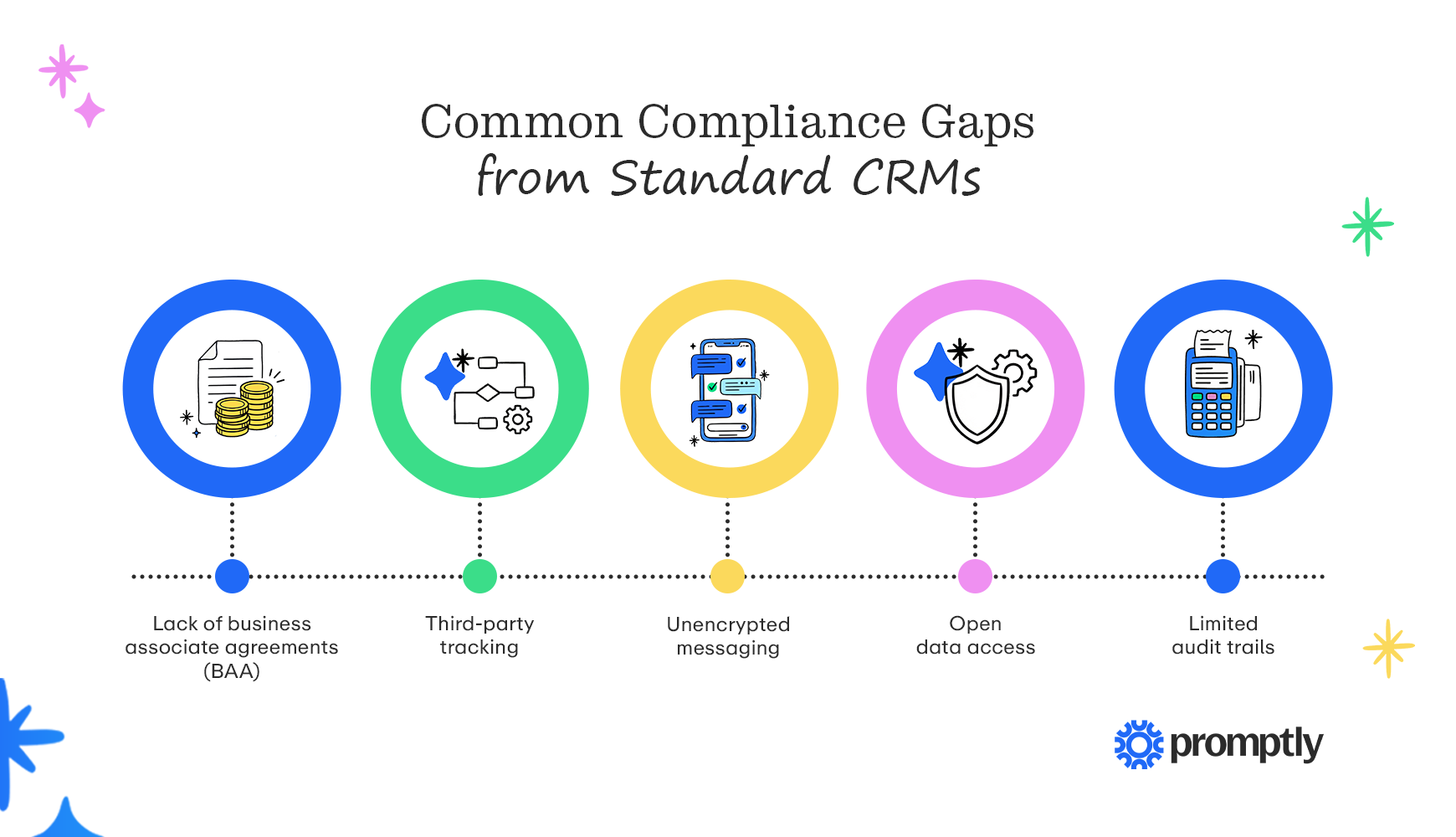
- Lack of business associate agreements (BAA): Standard commercial CRMs don’t often sign BAAs. Without one, the vendor has no legal obligation to protect patient data, and your practice carries full liability for anything that happens to it inside the platform.
- Third-party tracking: Many commercial platforms embed tracking pixels or share user activity with advertising networks. On a contact or appointment request page, this feature can pass details of a patient’s health inquiry to outside companies.
- Unencrypted messaging: Form submissions and alerts often arrive as regular emails, leaving copies of patient inquiries sitting in vulnerable staff inboxes.
- Open data access: Standard tools usually allow all users to view all records, but not all staff members should have access to PHI. Additionally, when access is open like this, one compromised password can expose months of patient inquiries.
- Limited audit trails: If you can’t determine who viewed or exported each record, you can’t document how you manage risk, and that documentation is one of the first things regulators ask for in an investigation.
Many practices already use some of these tools without realizing it, like a website form plugin that emails submissions to the front desk or an analytics tag a past agency added to your contact page. Before you shop for new software, list every tool that currently touches patient inquiries so you have a head start on the security risk analysis HIPAA requires.
What’s the difference between a healthcare CRM and an EHR or practice management system?
An EHR stores clinical information like diagnoses, treatment notes, and test results, while a practice management (PM) system handles the business side of care, such as appointments, billing, and patient demographics. A healthcare CRM focuses on the patient relationship before and between visits, including capturing inquiries, following up with prospective patients, sending reminders, and tracking referrals. Most practices integrate their EHR, PM, and healthcare CRM solutions to prevent information from falling through the cracks and provide staff with streamlined workflows.
Core features of a HIPAA-compliant healthcare CRM
A HIPAA-compliant CRM needs two sets of features: the relationship tools that help you attract, book, and keep patients, and the security features that protect their data along the way. When you evaluate patient appointment scheduling software or any other patient-facing platform, look at the full picture of how the tool handles a patient from first inquiry to follow-up visit, and how it protects their information at every step.
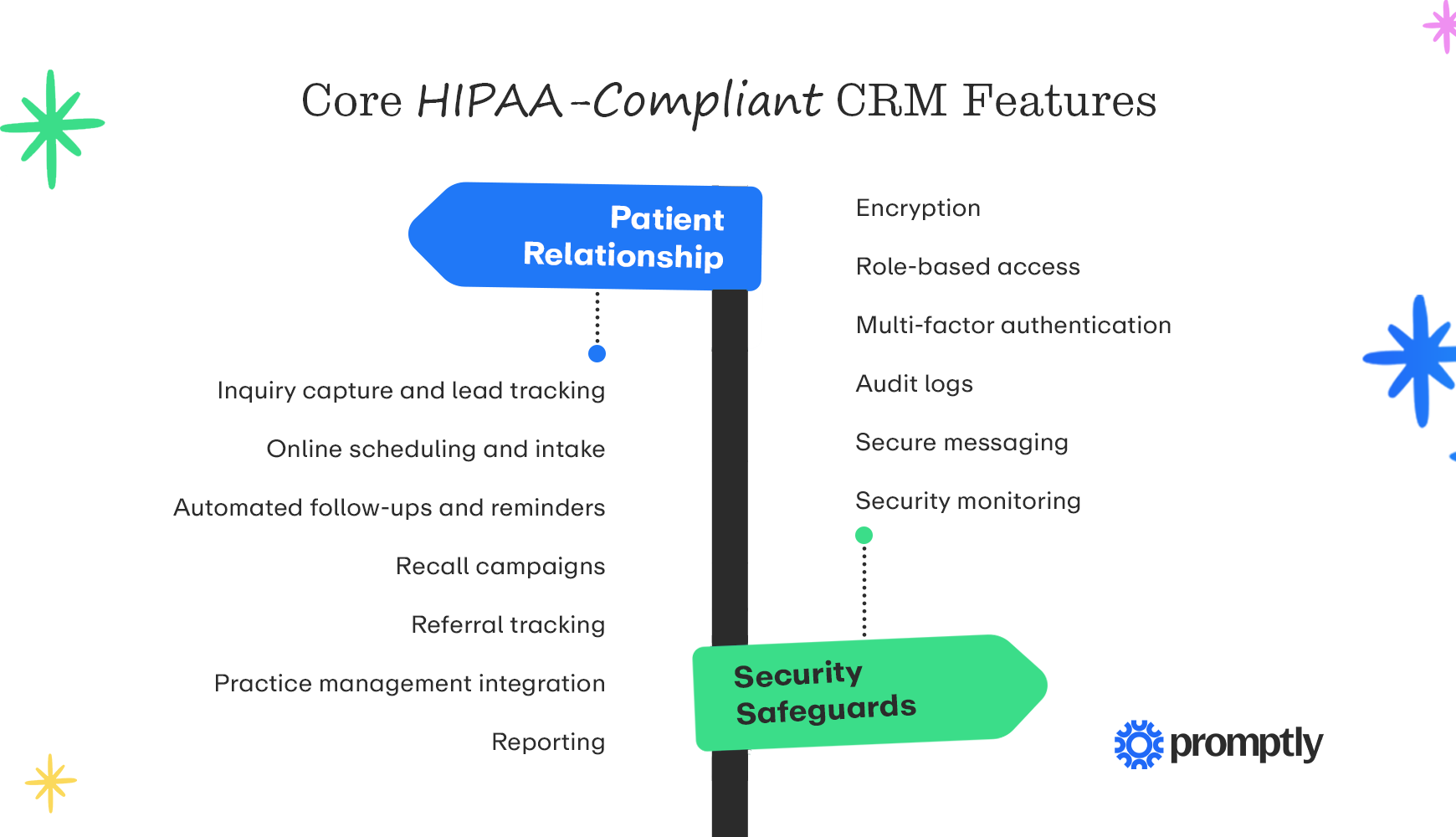
Patient relationship features
- Inquiry capture and lead tracking: Web forms, phone calls, live chat, and texts all feed into one pipeline so you can see where each prospective patient stands and who on your team owns the next step.
- Online scheduling and intake: Patients pick an open slot from your real-time availability, no phone call required. Then, they handle the intake process before even arriving at your practice, including forms, ID uploads, insurance cards, and consent signatures. Many platforms can also handle insurance eligibility verification simultaneously.
- Automated follow-ups and reminders: Patients shopping for a specialist often contact several practices and book with whoever answers first. With the right automations, your CRM replies within seconds and follows up with reminders and nudges for people who haven’t booked yet, all using team-approved templates.
- Recall campaigns: The CRM finds patients who are overdue for screenings or follow-ups and reaches out automatically.
- Referral tracking: Your liaison team can log physician visits and see which referring practices send you the most patients.
- Practice management integration: Two-way sync moves new appointments, form answers, and demographic updates between the CRM and your PM system without anyone retyping them.
- Reporting: Dashboards show where your inquiries come from, how many of them book, and which marketing channels are worth the spend.
Security safeguards
- Encryption: This scrambles patient data so nobody can read it without the right key. Ask vendors whether they encrypt data both while it’s stored and while it’s being sent between systems. Your IT person should look for security standards of AES-256 and TLS 1.2 or higher.
- Role-based access: Setting access by job role follows HIPAA’s minimum necessary standard, which means each person sees only the patient information their job requires and that PHI is only visible to staff members who need that access.
- Multi-factor authentication: A second login step, like a code sent to your phone, means a stolen password alone isn’t enough to get in.
- Audit logs: Every view, edit, export, and message involving a patient record should leave a trail that nobody at your practice or the vendor can change. If an auditor ever asks who opened a record and when, you’ll have the answer in a few clicks.
- Secure messaging: Regular texts work fine for basic logistical messages, but not for test results. Compliant platforms send patients encrypted links instead, so they can verify their identity and read sensitive details without creating yet another account.
- Security monitoring: Automatic alerts flag unusual activity, like a sudden spike in exports or a string of failed logins from an unfamiliar location. Your practice manager gets a heads-up in time to lock the account before anyone reaches patient data.

How to choose the right HIPAA-compliant CRM for your specialty practice
There’s no single best CRM for every practice, so the goal is to vet each option the same way. That means pairing a few HIPAA-specific checks with the questions you’d ask about any software purchase.
Here are a few steps you can take to make sure you choose the right HIPAA-compliant CRM for your practice:
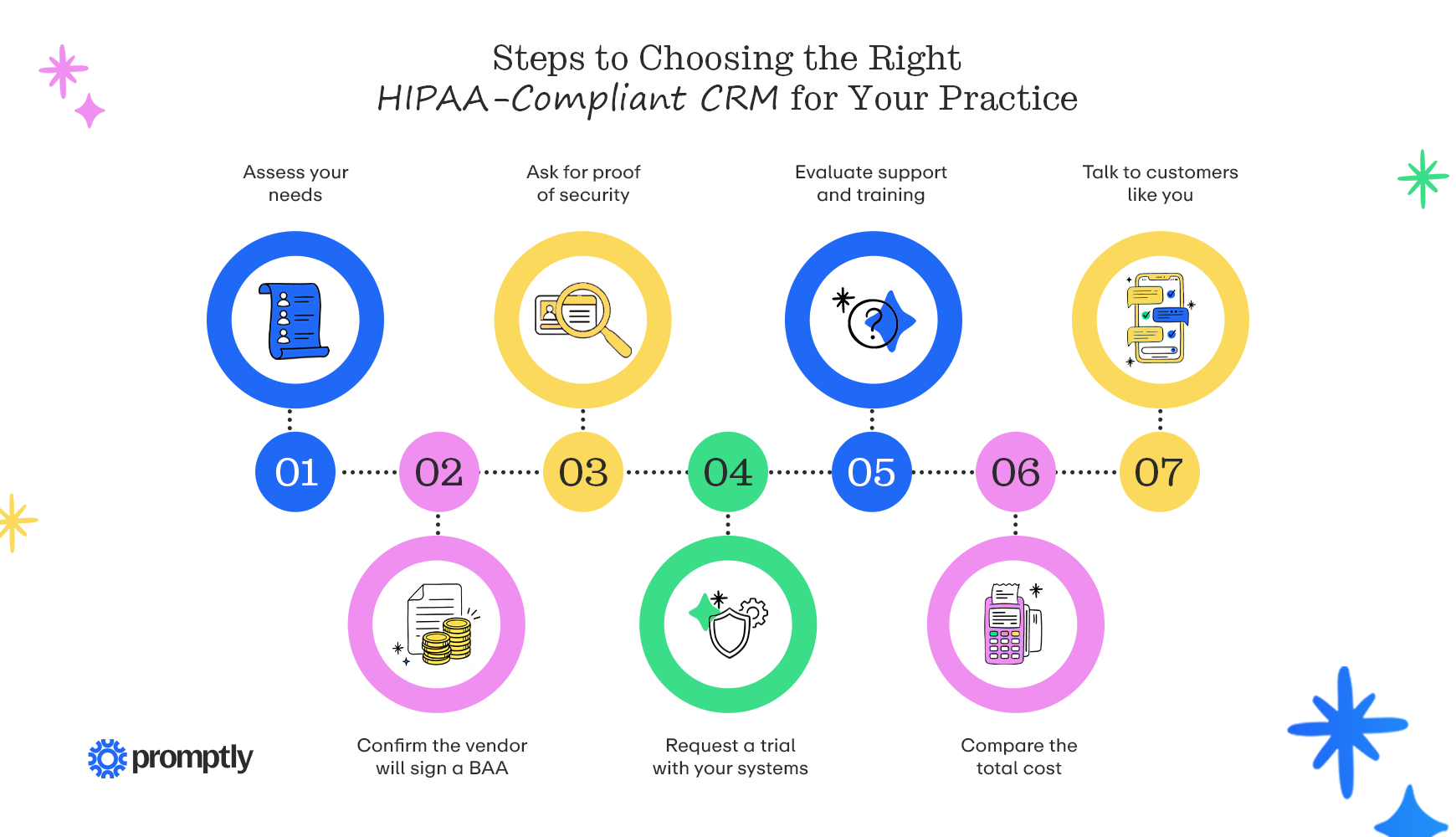
- Assess your needs: Before any demos, check how many of your inquiries from the past month have booked appointments and how quickly you responded to them. Additionally, ask your front desk which tasks take the most time, such as chasing patient intake paperwork. Features that fix your most time-consuming problems are your must-haves.
- Confirm the vendor will sign a BAA: Ask early whether the vendor signs a BAA on the plan you’re considering, and request a copy of its standard agreement to review. If the answer is no, cross that vendor off your list.
- Ask for proof of security: Anyone can put a compliance badge on a website. A SOC 2 Type II report shows that independent auditors tested the vendor’s security controls over several months, so ask for a copy and note any hesitation from the vendor.
- Request a trial with your systems: Ask whether you can try the platform connected to your PM system before you commit, then submit a few test inquiries with tricky insurance details, like a secondary plan or a recently changed policy, to see whether everything syncs without creating duplicate charts.
- Evaluate support and training: Find out who would handle setup, how long onboarding typically takes, and whether staff training is included in the price. Also, make sure support hours match your clinic hours to ensure speedy response times.
- Compare the total cost: A standalone CRM can look cheaper on paper until you add up the separate texting app, intake forms, and review tool you’d still need alongside it, plus the staff time spent moving data between them. Compare that full total against an all-in-one platform’s price, and ask each vendor which features cost extra.
- Talk to customers like you: Ask each vendor for references from practices in your specialty and of a similar size, and conduct your own research on third-party review sites. They’ll tell you how the rollout actually went.
When you narrow it down to your final two or three options, bring your front desk staff into the demos. They’ll use the system more than anyone, and they’re quick to spot problems that look fine in a sales pitch, like too many clicks to book an appointment or reminders that can’t be edited.
Promptly: A unified patient experience platform for specialty practices
We built Promptly on a simple idea: automate the tedious stuff so people can do the people stuff. Every part of the platform is designed for specialty practices, independently audited for SOC 2 Type II, HIPAA-compliant, and built with end-to-end encryption, role-based access controls, and detailed audit logs.
What you get with Promptly CRM:
- Lead management: Calls, web forms, live chat, and referrals land in a single dashboard that tailors automated outreach campaigns and follow-up tasks for your front desk. Lead status updates automatically through your PM system, and reports show response times, conversion rates, and the return on your marketing spend.
- Referral management: With Promptly, your referral pile can manage itself. Our built-in territory map helps liaisons plan outreach routes, and analytics show how their visits affect the number of referrals coming in.
- Reputation management: A short post-visit survey points happy patients to sites like Google and routes concerns privately to your staff. Your team can also respond to public reviews from one dashboard using HIPAA-compliant templates.
- One vendor instead of several: Leads, referrals, and reviews live in the same platform as digital check-in, contactless payments, and login-free patient links, so you can seamlessly view all the data you need in one place.
Promptly is an all-in-one solution that consolidates your tech stack. If you’re moving from several standalone tools, switch in stages, and cancel each subscription only after the matching Promptly module is live. This helps you avoid gaps in patient communication without immediately relying on redundant tools when you get started with our HIPAA-compliant CRM.

Switching CRM platforms goes more smoothly with a plan. Start by confirming who holds the privacy official and security official roles HIPAA requires, often the practice manager. Then move one workflow at a time, beginning with something like new website inquiries, and add reminders, intake, and payments once appointments and patient records sync correctly with your PM and EHR systems.
To see the payoff, track how much time your front desk spends on phone tag and data entry for two weeks before the switch, then compare afterward. Once you’re up and running, review your CRM user list every quarter and remove anyone who has left or no longer needs access to patient data. When your HIPAA-compliant CRM is fully functional, your return will be well worth the investment, resulting in compliant operations and a stress-free experience for staff and patients.
For more on modernizing your medical practice, read these guides:
- Healthcare CRM Systems: Choosing the Right Solution for Your Practice. Learn more about the different types of healthcare CRM systems and how you can select a solution that works for your practice’s unique needs.
- Digital Patient Engagement Tools: Modern Strategies for Specialty Care. Patients today expect a frictionless experience. Discover digital patient engagement tools that ensure a smooth patient experience.
- Insurance Verification Software: Automating Pre-Visit Financial Clearance. Insurance verification helps medical practices ensure that they’ll receive reimbursement for the care they provide. Explore solutions that support financial clearance workflows.
Modernize patient acquisition without compliance risks
Promptly brings patient communication, intake, and scheduling into one HIPAA-compliant platform, so your team can stop bouncing between a handful of logins.
Related Posts
About the author
Dr. Anish Kapur is a physician and tech entrepreneur advancing healthcare through innovation. He co-founded one of the first cloud-based EMR systems for specialists and now leads Promptly Technology Inc., whose Patient Experience Suite™️ helps specialty practices streamline workflows, boost patient engagement, and accelerate revenue—all in one modern platform.

Share this article:

We automate the tedious stuff so people can do the people stuff