
AI Chatbots in Healthcare: A Guide for Growing Practices
For patients, getting answers to pressing medical questions is a priority—and when your team is busy, they’ll use other tools to get that information, such as AI. Recent studies have found that 32% of U.S. adults turned to general-purpose AI chatbots like ChatGPT for health information in the past year, yet only 19% of medical group practices use a chatbot or virtual assistant to communicate with patients.
That gap means your practice isn’t engaging with patients in the way they prefer, and leaving value on the table in the process. Plus, AI technology can alleviate staff workload and improve satisfaction in an industry plagued with burnout.
In this guide, we’ll explore what AI chatbots in healthcare can handle, how to choose the best fit, and how to implement them into your operations.
- AI chatbots in healthcare FAQs
- 7 ways AI chatbots help healthcare practices
- How to evaluate a healthcare AI chatbot
- How to roll out a chatbot with your team
- The top healthcare AI chatbot: Promptly PaigeAI
AI chatbots in healthcare FAQs
What are AI chatbots in healthcare?
A healthcare AI chatbot is a software solution that holds a written conversation with patients, with little or no staff involvement. Patients usually reach it in one of two places: a chat window on your website or a text thread on their phone. Either way, it uses conversational AI to understand everyday questions and complete tasks like booking an appointment or sharing your office hours.
That's a big step up from older chatbots, which worked like a phone tree with static options that didn't cover every patient question. Conversational AI understands how people actually write, so it gives more helpful answers. The same technology also powers AI voice agents, which handle phone calls instead of typed messages.
An example of an AI chatbot in action
Let's say a patient texts your practice to ask if they can move Thursday's appointment to next week. Here's how each type of chatbot would respond:
- Legacy: The bot replies with a menu: Reply 1 for office hours, 2 for directions, 3 to speak with staff. None of the options fit, so the patient picks 3, leaves a message, and waits for a callback during business hours. Someone at your front desk then reschedules the visit by hand.
- Modern: The bot confirms which appointment the patient is referring to, Your follow-up with Dr. Patel on Thursday at 10:30 a.m.?, then offers a few open slots next week. The patient taps Tuesday at 2:00 p.m.; the change is saved to your practice management (PM) system, and the bot sends an updated reminder. Nobody on your team has to touch it.
Website chat and texting work best side by side. A website chatbot catches people browsing your site, often new patients, while texting reaches patients who already have an appointment on the books. Either way, a chatbot works best as one part of your digital front door, connected to the rest of your patient engagement software so everything it captures lands in your records.
Will AI chatbots replace front-desk staff?
For most practices, no. Instead of replacing staff entirely, AI chatbots are largely being implemented across the space as tools to alleviate existing staff pain points. 81% of physicians already use AI professionally, and 70% it as a way to automate the tasks that contribute to burnout. 68% of practice leaders say they haven’t redesigned a role or adjusted staffing because of AI in the past year.
Here’s how practices are using healthcare AI chatbots according to a recent MGMA poll:
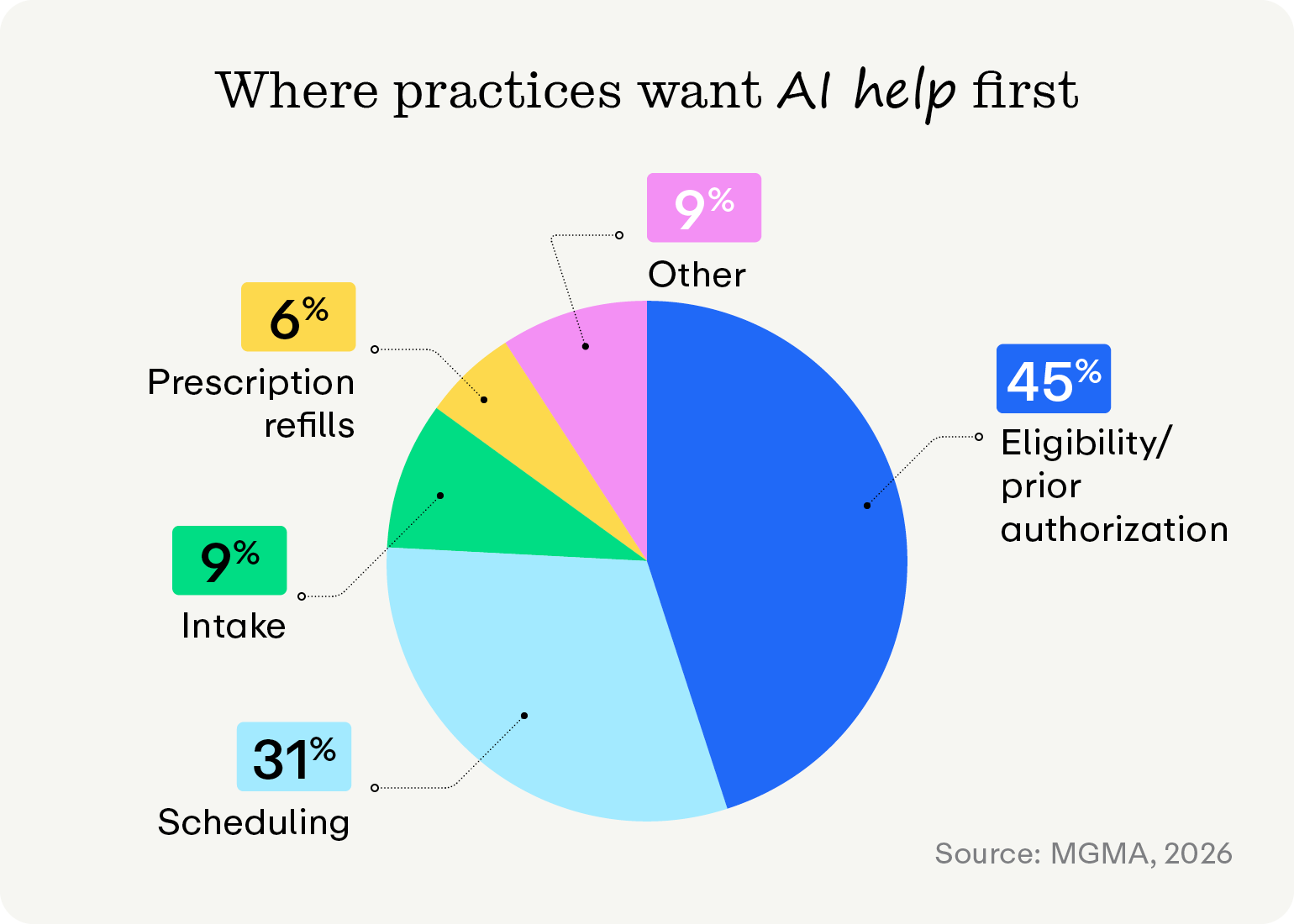
Here are the tasks that practices want AI to handle first:
- Eligibility/prior authorization (45%)
- Scheduling (31%)
- Intake (9%)
- Other (9%)
- Prescription refills (6%)
The practices that get the most out of chatbots set a clear division of labor. The chatbot takes booking, reminders, directions, forms, and balance questions. Your team takes clinical questions, upset patients, billing disputes, and anything urgent. That split reflects a belief we hold at Promptly: automation should humanize healthcare.
What can AI chatbots handle?
Chatbots are best suited for simple tasks and inquiries, while humans should step in for more complex jobs. Here’s how tasks are usually divided between AI chatbots and human team members:
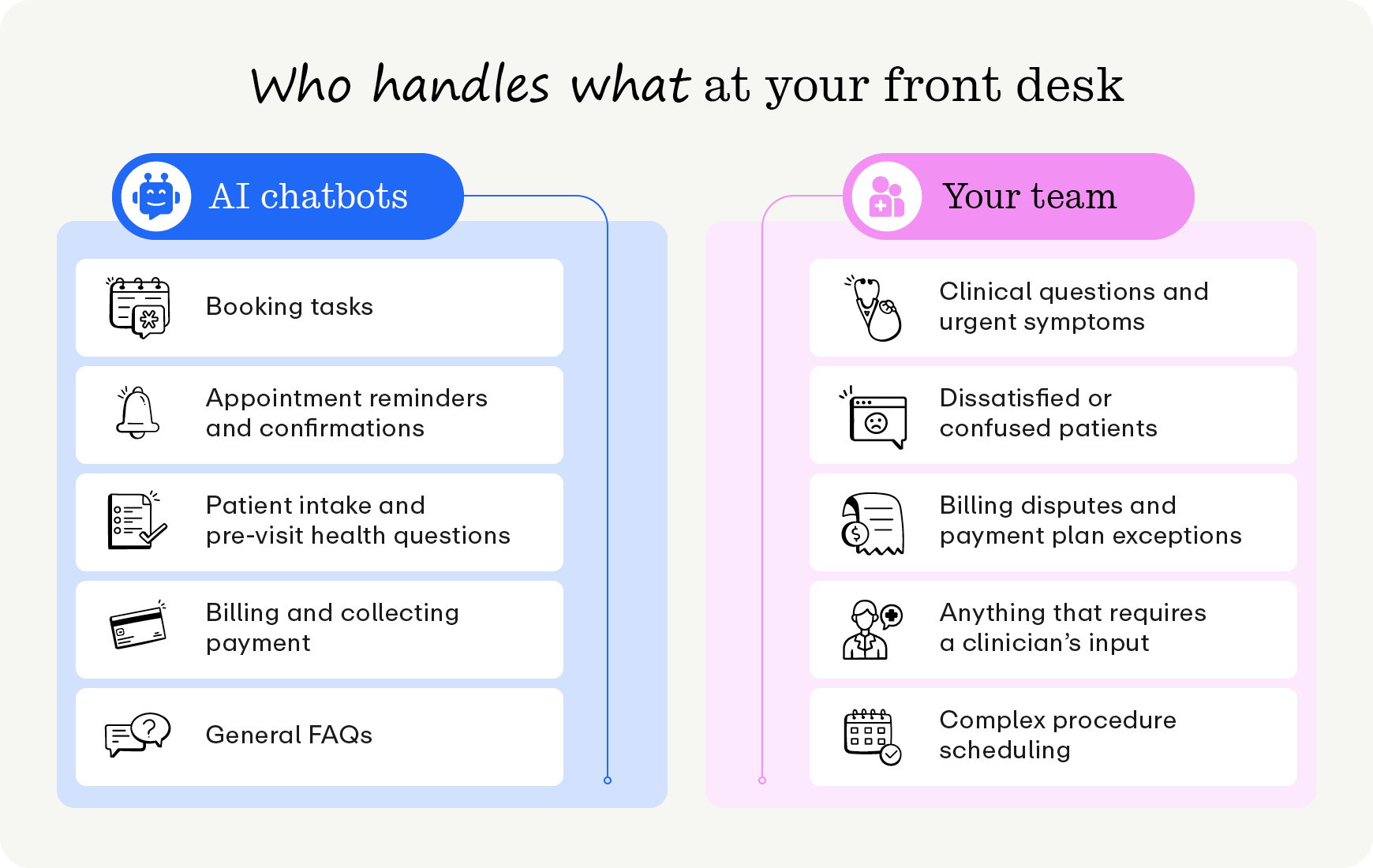
AI chatbots
- Simple booking tasks, like appointment scheduling, changing, and cancellations
- Appointment reminders and confirmations
- Patient intake and pre-visit questions
- Billing and payment questions
- General FAQs, like office hours, directions, and parking
Human staff
- Clinical questions and urgent symptoms
- Upset or confused patients
- Billing disputes and payment plan exceptions
- Anything that needs a clinician's sign-off, such as prescription refills
- Complex scheduling, like coordinating surgery or visits with multiple providers
As a general rule, if your staff answers a question 40 times a day, a chatbot can likely answer it too. The same principle drives healthcare automation more broadly. Clinical judgment, urgent symptoms, and upset patients still require human patient skills, and a good chatbot recognizes those conversations and hands them off quickly.
Are AI chatbots in healthcare HIPAA compliant?
It depends on the vendor. A chatbot is HIPAA-compliant only if the vendor protects patient data under HIPAA rules and signs a business associate agreement (BAA) with your practice. This agreement ensures that the software provider adheres to regulations and security standards that govern protected health information (PHI).
Before you sign with any vendor, get clear answers to these questions:
- Where is PHI stored?
- What PHI does the AI tool access and use?
- Is PHI encrypted?
- What security standard does the platform pass?
- Who on the vendor’s side can access PHI?
- Is any of it used to train outside AI models?
7 ways AI chatbots help healthcare practices
1. Scheduling, changing, and canceling appointments
AI chatbots allow patients to book, move, or cancel appointments via text or chat at any hour, choosing from open slots on your actual calendar, alleviating your front desk from phone tag.
This feature also helps you maximize your schedule. When a patient cancels, an automated waitlist offers the slot to the next patient in line, ensuring you don’t lose that revenue or leave awkward gaps in the clinician’s schedule.
Booking management AI chatbots can be deployed both on your website and over text. Regardless of where you use the AI chatbot, make sure it writes changes and new data straight into your PM system. If a vendor's bot only collects the request and emails it to your staff, someone still has to book the appointment by hand. The AI chatbot that integrates with your tech stack and takes as many redundant administrative tasks as possible off of your staff is the best choice for most practices.
2. Reminders and confirmations
Missed appointments are a pain point for both clinicians and patients. Using an AI chatbot to send text reminders lets patients confirm or reschedule with a quick reply. It’s a win-win: your practice keeps a full schedule while minimizing no-shows, and your patients get the care they need when they expect it.
Besides appointment reminders, you can also use AI chatbots to send follow-up messages relevant to patient care plans. Let's say you're helping a post-op patient who just got a hip replacement. You might configure your AI chatbot to send standard reminders to the patient, such as when to do their home exercises, when their first physical therapy session is, and when to come in for their two-week incision check. If the patient replies with a concern, such as increased pain or a fever, the chatbot flags the message to your care team instead of answering it, so that experts can provide the final word.
3. Intake and insurance checks
Handing patients cumbersome, time-consuming manual intake forms can frustrate the patient and back up your entire schedule. AI chatbots can automatically trigger a login-free link to digital intake forms, so patients finish their paperwork on their phones before they arrive.
Once patients have submitted their details, AI chatbots run a real-time insurance eligibility verification check that flags coverage issues before the visit. With the right insurance verification software, your team can see copays and deductibles in advance, enabling proactive communication with patients and preventing stressful surprise payments down the line.
4. Billing and payment questions
If your AI chatbot and billing solution are integrated, collecting payments becomes much easier for patients and your front desk. When a patient asks about billing, the chatbot can look up their balance and reply with the amount and a payment link. Then, the patient can pay by card or mobile wallet right from that text, no portal login required, through patient payment software connected to the chatbot. Complex billing disputes and payment plan requests still go to a person to prevent errors.
5. Referral intake
Referral management is an entirely different beast from standard intake, requiring cross-practice communication and accurate data writeback to ensure nothing gets lost in the shuffle. AI can read incoming referral faxes, extract patient details, and route each referral to the appropriate queue. This prevents your referral coordinator from retyping information or deciphering illegible faxes.
6. After-hours calls and questions
Phones remain the biggest drain on front-office time. Without after-hours coverage, calls that come in after you close wait until the next morning for the next action.
That's where AI voice agents come in. These tools work closely with chatbots, using the same conversational logic to answer after-hours calls, route them to the right person, and book appointments. Patients get help through their preferred channel, and connected patient communication software keeps every text, chat, and call in one place.
7. Routine patient questions
Questions about hours, directions, parking, and other logistical details may seem simple, but they add up over the course of a full day. AI chatbots can answer these questions easily, alleviating your phone lines and helping patients come prepared for the appointment.
How to evaluate a healthcare AI chatbot
Not all AI chatbots in healthcare are created equal. When evaluating possible solutions, bring these questions to every vendor conversation:
- Does it write back to your PM system? A read-only chatbot can look up information. A write-back chatbot can enter it, whether it’s a booked slot on the calendar, a completed form in the chart, a payment on the account. If the bot can’t write back, your team will need to reenter the data it collects anyway.
- How does it hand off tasks to people? Ask which triggers send a patient to staff (e.g., a nuanced clinical question, signs of patient dissatisfaction, or a billing dispute) and if they are customizable. Then, find out whether the AI chatbot records the full conversation when they pick up the task, so the patient doesn’t have to repeat themselves.
- What happens after hours? Discover what the bot can complete overnight and what waits for morning. A bot that books appointments at 9 p.m. saves your team time; one that queues overnight messages for 8 a.m. action just moves the burden back to your team.
- What can you see? Ask for reporting on tasks the AI chatbot completed, handoffs, and questions the bot couldn’t answer. Having access to these reports empowers you to act on gaps and improve the AI’s responses.
Read-only vs. write-back chatbots
Write-back is the biggest difference between a chatbot that saves your team time and one that doesn't. Here's how the same booking request plays out with each type:
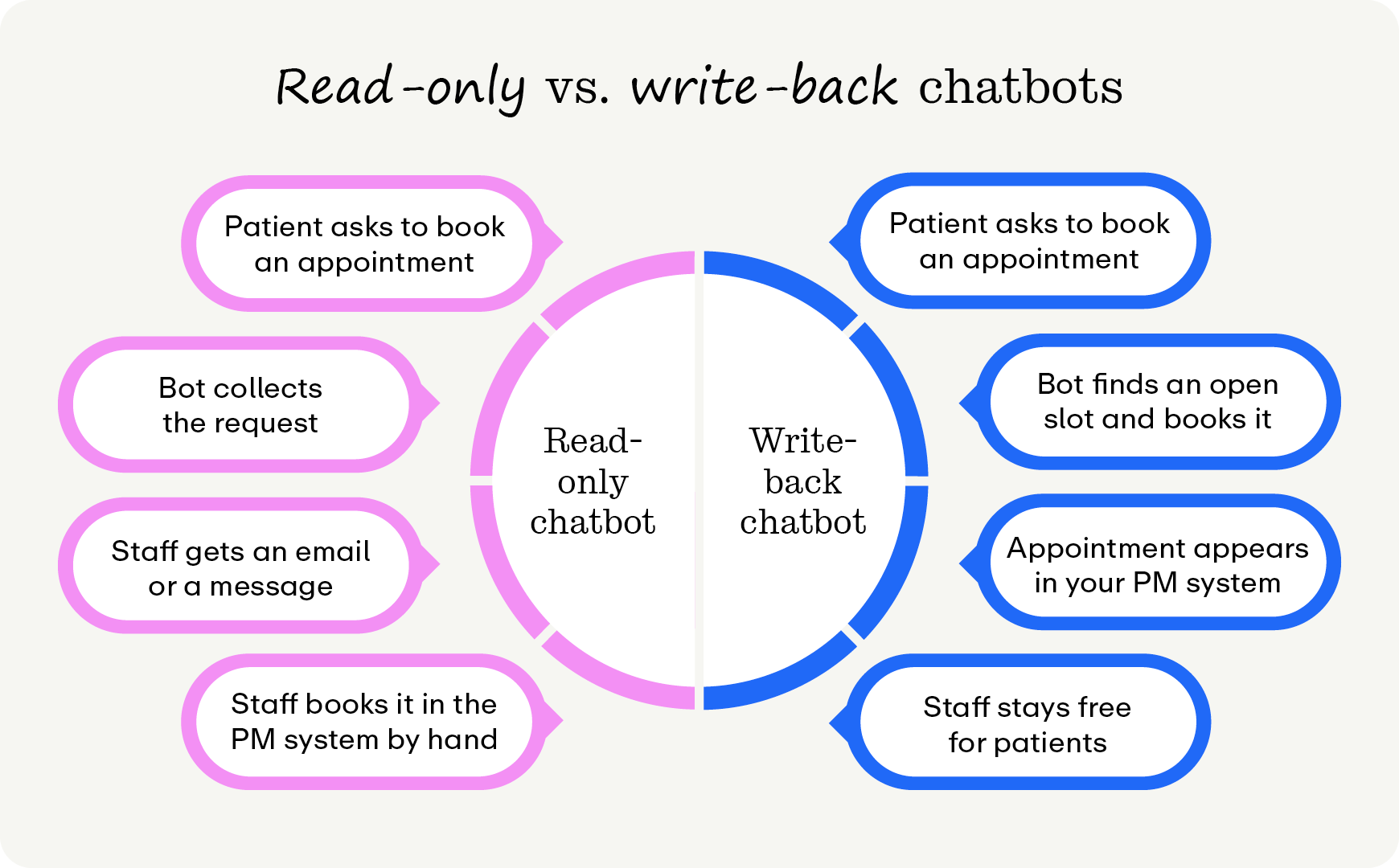
Read-only chatbot
- Patient asks to book an appointment
- Chatbot collects the request
- Staff gets an email or a message
- Staff books it in the PM system by hand
Write-back chatbot
- Patient asks to book an appointment
- Chatbot finds an open slot and books it
- Appointment appears in your PM system
- Staff stays free for patients
During the vendor demo, ask the rep to book a test patient into a sandbox calendar while you watch. Then ask them to show you where that appointment lands in your PM system. Putting this information together shows if the tool will help you or just add more work to your plate.
How to roll out a chatbot with your team
A rollout that keeps your team on board usually follows these steps:
- Ask your front desk first. Your staff knows which questions they’re asked the most and which tasks take up their time. Strategizing based on this list shows you where to focus your efforts first.
- Run a pilot. Once you’ve pinpointed the biggest pain points to address, run the pilot for 30 to 60 days, asking staff for feedback regularly. Use what staff see during that window to adjust the tasks your AI chatbot is taking on or handoff processes.
- Be clear with patients. Let patients know they’re talking to an AI assistant, and make the path to a person obvious. Being upfront helps patients feel more comfortable using the technology, boosting adoption.
- Track a few key metrics. Collecting metrics enables your team to make informed decisions about the tool’s operational impact. You might track metrics such as inbound call volume, tasks the chatbot completed without help, handoff rate and reasons, after-hours bookings, and no-show rate against your pre-pilot baseline.
- Listen to patients. Short post-visit satisfaction surveys and review requests help you catch problems early. Add scaled and open-ended questions about your chatbot in particular to properly attribute results.
Once the pilot shows results, share them with the people who made them happen. Telling your front desk how many hours the chatbot gave back, and what they did with that time, builds trust in the next phase of your rollout.
The top healthcare AI chatbot: Promptly PaigeAI
Looking for an integrated healthcare AI chatbot that works seamlessly with the best patient engagement tools? Promptly is the top patient experience suite for specialty practices, handling the busywork behind patient conversations so you can provide the best care possible. Promptly’s AI chatbot helps patients schedule, change, and cancel appointments, access appointment availability, and get answers to FAQs—and your team doesn’t have to lift a finger.
Promptly’s ecosystem of AI tools works together for a smooth patient experience. On the front end, PaigeAI Voice routes them to the right staff member, responds to new leads, and answers common patient questions before a consultation. Behind the scenes, AI assistants read and sort incoming referral faxes, track prior authorizations, post insurance payments, and search for coverage patients didn't know they had.
If your team is hesitant about using healthcare AI chatbots, we have you covered. Our approach is using AI to humanize healthcare, so our tools allow your team to focus on aspects of care that require a personal touch. With automation handling your administrative challenges, you can give more to the patients who fuel your practice.

Simply put, the best AI chatbot for your practice is the one that finishes work for your team instead of kicking it down the line. Healthcare AI chatbots can take your practice to the next level of responsiveness and efficiency, so your team can spend more time on the human stuff.
Want to learn more about AI and automation for medical practices? Check out these resources:
- An Essential Guide to AI Healthcare Technology for Practices. Explore ways AI can support your practice, from smart scheduling to denial management.
- An Ultimate Guide to Automation in Healthcare: 15 Use Cases. See which workflows are ready to automate and how to roll out new tools without overwhelming your team.
- Reduce Patient No-Shows With Smart Scheduling Tools and Custom Communications. Learn how reminders, waitlists, and two-way texting keep your schedule full.
Our AI tools humanize healthcare.
Try them for yourself today.
Related Posts
About the author
Dr. Anish Kapur is a physician and tech entrepreneur advancing healthcare through innovation. He co-founded one of the first cloud-based EMR systems for specialists and now leads Promptly Technology Inc., whose Patient Experience Suite™️ helps specialty practices streamline workflows, boost patient engagement, and accelerate revenue—all in one modern platform.

Share this article:

We automate the tedious stuff so people can do the people stuff